Jump to a question in this guide
- What different jobs hide behind similar-looking power devices?
- Why do more sockets not mean more available electricity?
- What is a surge, and how is it different from an outage?
- Does surge protection replace a breaker, GFCI or AFCI?
- How does a UPS keep selected equipment supplied?
- Why might only some UPS outlets stay on?
- What do power and runtime describe?
- Why can the computer stay on while the internet stops?
- What can an indicator or alarm actually tell me?
- What changes as the battery ages or the arrangement changes?
- Where does qualified electrical work begin?
- Why is orderly shutdown a separate job from keeping power on?
- How would a fictional desk setup become a clear support request?
- What belongs in the handover and the next learning step?
- More sockets do not create circuit capacity.
- Surge suppression and battery-backed continuity answer different questions.
- Each necessary device and outside service has its own dependency.
- Status meanings, maintenance and response come from the exact model and qualified scope.
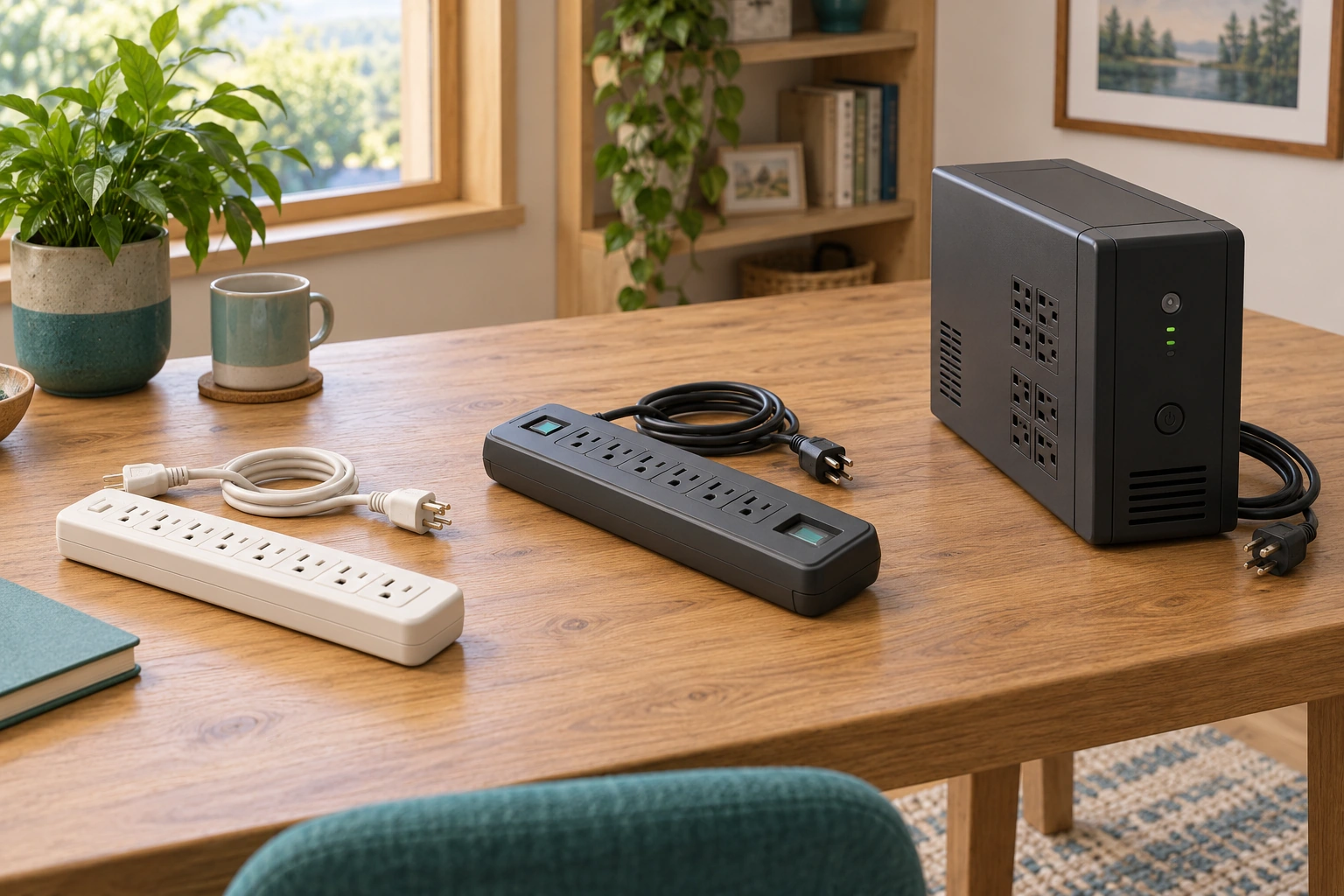
The disconnected bar, surge-strip-style device and UPS sit separately. Their different housings help compare outlet access, stated surge suppression and stored power without creating a chain of extensions.
About this illustration
Exterior illustration cannot identify capabilities, ratings or Canadian approval of an actual product. This is a conceptual teaching model, not an assessment of your home.
7 picture lessons appear beside the questions in this guide. Use them to understand the explanation, then consider what it means for your home.
What different jobs hide behind similar-looking power devices?
A power bar gives several plug positions at one place. A surge protector adds a stated function for certain brief voltage disturbances. An uninterruptible power supply, usually shortened to UPS, can keep selected connected equipment supplied from stored energy when its normal supply is interrupted. The housings can look similar, and a UPS can include surge protection, but the names describe different jobs. Start with the job needed before comparing sockets, displays or prices.
For a desktop computer, the desired result might be enough supported time to preserve work and shut down normally. For a router, it might be continued local networking during a brief interruption, subject to every other required device and the outside service. For a desk with too few permanent outlets, the underlying question may be the electrical installation. Buying a larger-looking accessory does not resolve all three situations in the same way.
The comparison picture places three disconnected devices on one desktop. Their separate bodies help you ask about outlet distribution, surge suppression and stored-energy supply. Exterior appearance cannot identify a real product’s capabilities. A switch, indicator window or heavy enclosure is a reason to read its label and matching instructions, not a substitute for them. Keep the manufacturer, exact model and supplied safety documentation together.
This guide owns plug-connected protection and device-level continuity. The existing protection guide explains breakers, GFCI and AFCI; the home-battery guide explains installed backup and selected circuits; the outage guide covers household functions and alternatives. Those topics connect here without becoming duplicates. A small UPS beneath a desk should not silently become a plan for refrigeration, heating, medical needs or the whole house.
Similar plug positions can serve different jobs
The disconnected bar, surge-strip-style device and UPS sit separately. Their different housings help compare outlet access, stated surge suppression and stored power without creating a chain of extensions.
Numbers identify the parts explained below.
- Plain bar
Provides plug positions; appearance does not establish surge protection.
- Strip with status window
Invites matching its stated protective function to actual documentation.
- UPS enclosure
Adds a stored-energy question whose output and duration remain model-specific.
What does this illustration leave out?
Exterior illustration cannot identify capabilities, ratings or Canadian approval of an actual product. This illustration explains an idea. It is not an installation guide.
What exact job does each model claim and support?
Explore this with HomeAI ↗Opens an editable question. Nothing is sent until you choose to send it.Three separate jobs behind similar sockets
Outlet access, transient suppression and stored-energy supply are distinct jobs. A combined model needs its exact documentation.
Numbers identify the parts explained below.
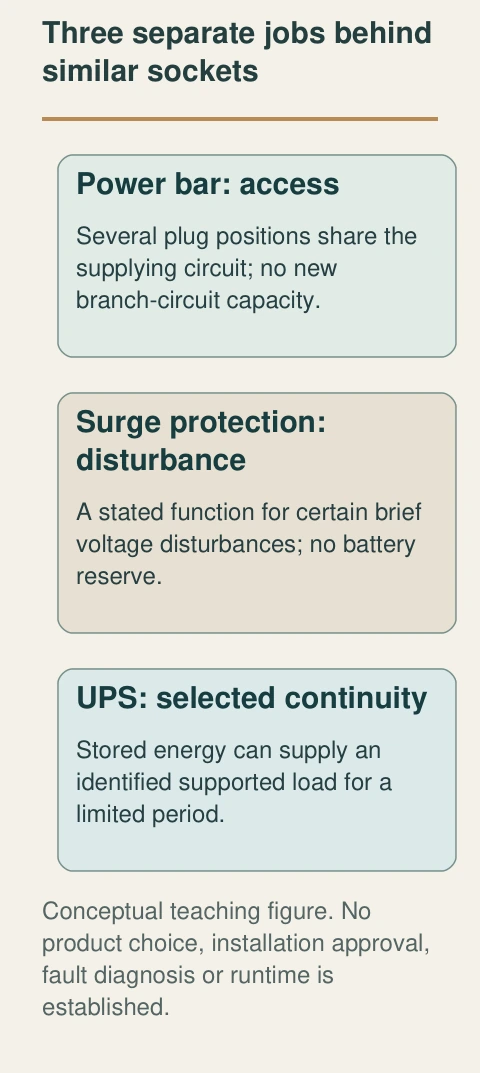
- Power bar: access
Several plug positions share the supplying circuit; no new branch-circuit capacity.
- Surge protection: disturbance
A stated function for certain brief voltage disturbances; no battery reserve.
- UPS: selected continuity
Stored energy can supply an identified supported load for a limited period.
What does this illustration leave out?
No product choice, installation approval, fault diagnosis or runtime is established. This illustration explains an idea. It is not an installation guide.
Which actual job and model does this household need?
Explore this with HomeAI ↗Opens an editable question. Nothing is sent until you choose to send it.Three jobs to identify before choosing equipment
- Power barSeveral plug positions; no additional branch-circuit capacity.
- Surge protectionStated response to certain brief voltage disturbances; no stored-energy continuity.
- UPSStated selected-load battery supply; duration and compatibility remain bounded.
Combined functions depend on actual model; no product recommendation.
Further reading: Schneider Electric Canada · Whole Home Surge Protection; Eaton Canada · Uninterruptible power supply FAQ; Electrical Safety Authority · Indoor Safety.
Read the complete figure
Three separate jobs behind similar sockets
Outlet access, transient suppression and stored-energy supply are distinct jobs. A combined model needs its exact documentation.
- Power bar: access
- Several plug positions share the supplying circuit; no new branch-circuit capacity.
- Surge protection: disturbance
- A stated function for certain brief voltage disturbances; no battery reserve.
- UPS: selected continuity
- Stored energy can supply an identified supported load for a limited period.
What remains unknown: No product choice, installation approval, fault diagnosis or runtime is established.
A useful question: Which actual job and model does this household need?
Why do more sockets not mean more available electricity?
The wall outlet is part of a branch circuit: the household wiring and protection supplying an identified group of loads. A power bar divides access to that supply among its outlets. It does not create additional circuit capacity. Equipment plugged into the bar still draws through the bar’s cord and the supplying installation. The number of empty sockets therefore answers a physical-access question, not an electrical-capacity question.
Different labels concern different boundaries. A product’s rating describes that product under its specified conditions; the branch circuit has its own wiring and protective arrangement. Other outlets can share the circuit even when they sit in another room. An old directory is useful background, but it does not verify those connections. Ask a qualified electrical professional to assess an ongoing outlet shortage or a proposed load rather than estimating permission from a socket count.
Ontario’s Electrical Safety Authority advises against using extension cords as long-term power sources and against chaining them. Its indoor guidance also directs portable heaters straight to a wall outlet rather than a strip or extension. Keep those instructions beside the equipment question. A strip beneath a desk is not a general invitation to add a heater, kitchen appliance or another strip simply because its plug fits.
The useful owner record lists the equipment actually connected and the ordinary purpose of each item. Say whether a printer, charger or monitor was added after the original setup. A service provider can then compare the stated arrangement with matching instructions and the electrical scope. This is an inventory for discussion, not an owner calculation clearing the circuit, an invitation to open covers or a method for deliberately finding the tripping point.
What is a surge, and how is it different from an outage?
A surge is a brief voltage rise. An outage is loss of the normal supply. A disturbance can also involve voltage outside an equipment’s accepted range without being a complete outage. These descriptions concern different electrical conditions. A household report that the lights flickered is useful timing information, but it does not identify the waveform, source or cause of damage to another device.
A surge protective device is intended to limit certain transient voltage effects within its design and installation. That is a protection job, not an energy-storage job. If the normal supply disappears, a surge-only strip has no battery reserve to keep the computer running. Conversely, a UPS continuing to supply one load does not establish that every disturbance on every connected route has been eliminated.
The Canadian Schneider page discusses externally and internally generated surges and distinguishes ordinary strips from surge protection. Its broad marketing language should be read with the actual equipment documentation. This guide does not adopt the page’s monthly surge count, conflicting warranty amounts or an unlimited promise to protect everything. A manufacturer’s description explains an intended function; the installed scope and exclusions still matter.
Record what was observed without giving it an electrical diagnosis. Power interruption at a known time, a displayed warning and an affected device are different entries. Preserve any utility notice and professional finding separately. Do not repeatedly disconnect supply, create a disturbance or move suspect equipment between outlets to identify a cause. Damage, recurring trips or abnormal heat belong with qualified help, while smoke, sparks or immediate danger take priority over collecting evidence.
Does surge protection replace a breaker, GFCI or AFCI?
No single protection name answers every electrical hazard question. A breaker’s overcurrent function responds to excessive current under its design. GFCI protection compares outgoing and returning current. AFCI protection concerns certain hazardous arcing characteristics. Surge protection concerns certain brief voltage disturbances. A product can combine functions, but one familiar button or illuminated indicator does not prove that all are present.
Think about the question rather than the accessory’s reputation. A damaged cord, a ground-fault concern, a repeated protective trip and a transient-voltage concern need different investigation. Adding a surge strip does not repair the cord or establish the condition of the branch wiring. Adding a UPS does not authorize a larger electrical load or defeat the existing protective device. Keep those boundaries visible when requesting advice.
The existing breaker/GFCI/AFCI guide explains the functions in greater depth and remains the canonical owner for trip interpretation. Here the useful consequence is simple: name the actual product and its stated function before calling the arrangement protected. If the label is inaccessible or unclear, keep the identity unresolved and ask the manufacturer or appropriate professional. Do not remove a device or cover to improve the photograph.
A professional report should identify what was examined and what the finding supports. An assessment of a plug-connected UPS can be useful without clearing every household circuit. An electrical repair can address an identified wiring issue without proving the computer’s data was preserved during an earlier event. These are connected services with different deliverables. Ask for the finding and remaining question in ordinary words, rather than collecting an unexplained assurance that the desk is now safe.
How does a UPS keep selected equipment supplied?
A UPS has an input receiving normal power, internal energy storage and an output supplying connected equipment. Its controls determine how normal input and stored energy support the output. During supported battery operation, stored energy is converted into the electrical supply the connected equipment needs. The battery contains a finite reserve; the UPS does not create energy when the utility is unavailable.
Manufacturers use different arrangements. A standby design normally supplies the load from input and changes to battery when its controls detect a qualifying problem. A line-interactive design also regulates certain input-voltage changes. An online double-conversion arrangement normally converts the incoming supply before delivering the output. These broad categories explain why transfer and conditioning behaviour differ; they do not select a suitable product for a particular computer.
The home-office cutaway shows a closed UPS between a wall receptacle and selected desk equipment. Follow that limited relationship: normal input reaches the UPS and its output serves the identified load. No exposed battery, internal switching or wiring is drawn. The picture is context for the native input/storage/output figure, which explains the energy paths without pretending that an illustration is an inspected installation.
Compatibility includes the actual load, the model’s output, the allowed connection and the desired response. A reassuring category name cannot answer every detail. Ask the manufacturer or qualified provider which evidence establishes support for the named equipment and use. This guide supplies no transfer-time limit, waveform choice, generator pairing or approval for life-sustaining equipment. Those decisions need the exact equipment and an appropriate professional scope.
A desk UPS serves a limited equipment task
The closed UPS receives a visible wall supply beside a desktop computer and monitor. It gives context for selected device continuity rather than supplying the whole house. The computer’s complete lead-to-output route is concealed, so the native figure explains that relationship.
Numbers identify the parts explained below.
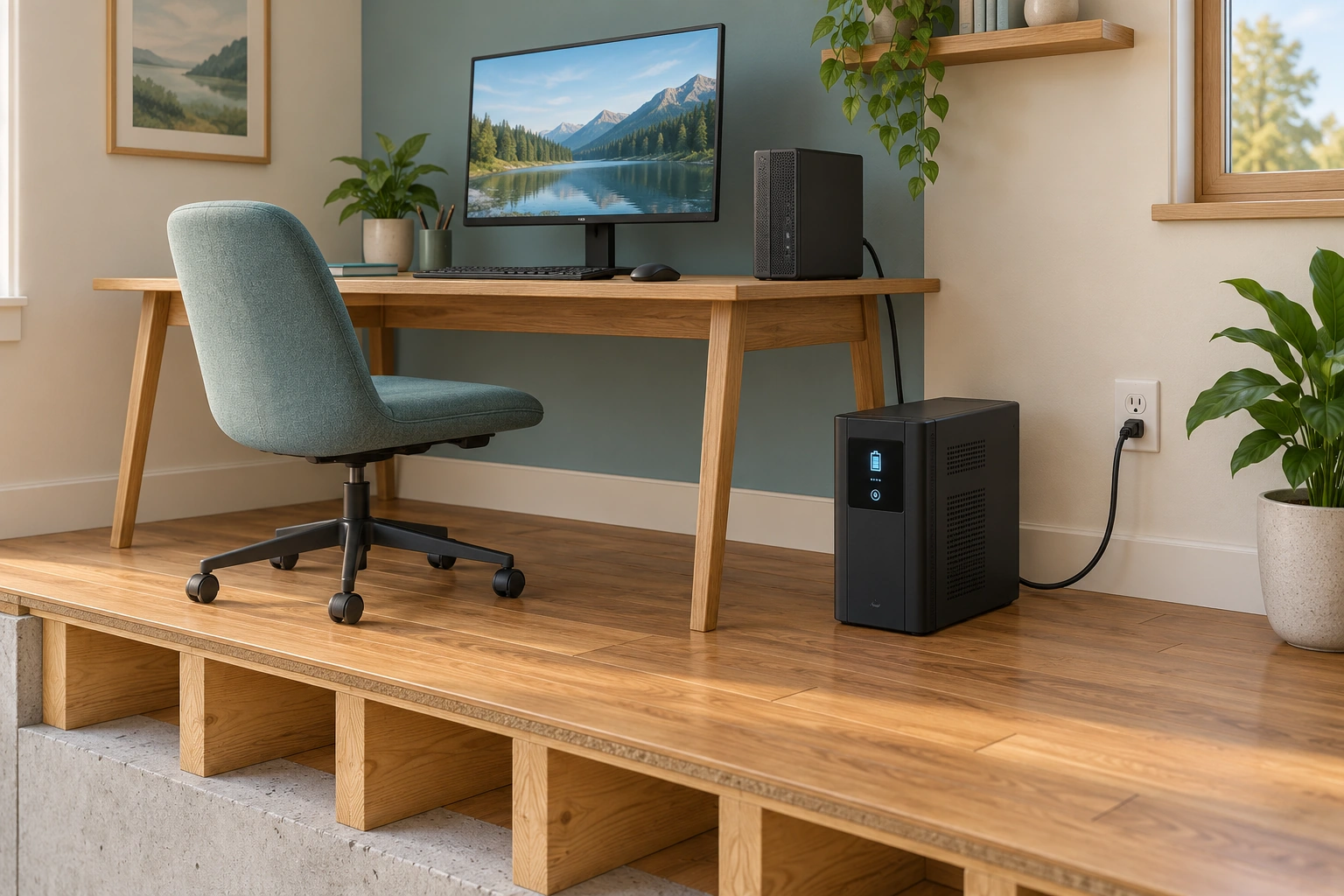
- Wall receptacle and input
The visible cord supplies the closed UPS; circuit suitability remains a qualified question.
- Closed UPS
Contains finite stored-energy and control functions for its named supported task.
- Computer and monitor
Separate equipment roles need their actual output and data-workflow confirmation.
What does this illustration leave out?
Conceptual office; no confirmed output assignment, cable continuity behind the desk, capacity, runtime or electrical approval. This illustration explains an idea. It is not an installation guide.
Which actual equipment and output assignment are documented?
Explore this with HomeAI ↗Opens an editable question. Nothing is sent until you choose to send it.Follow input, storage and output
Normal input and stored energy are different sources within the UPS arrangement. Only the model-identified output and supported load are in scope.
Numbers identify the parts explained below.
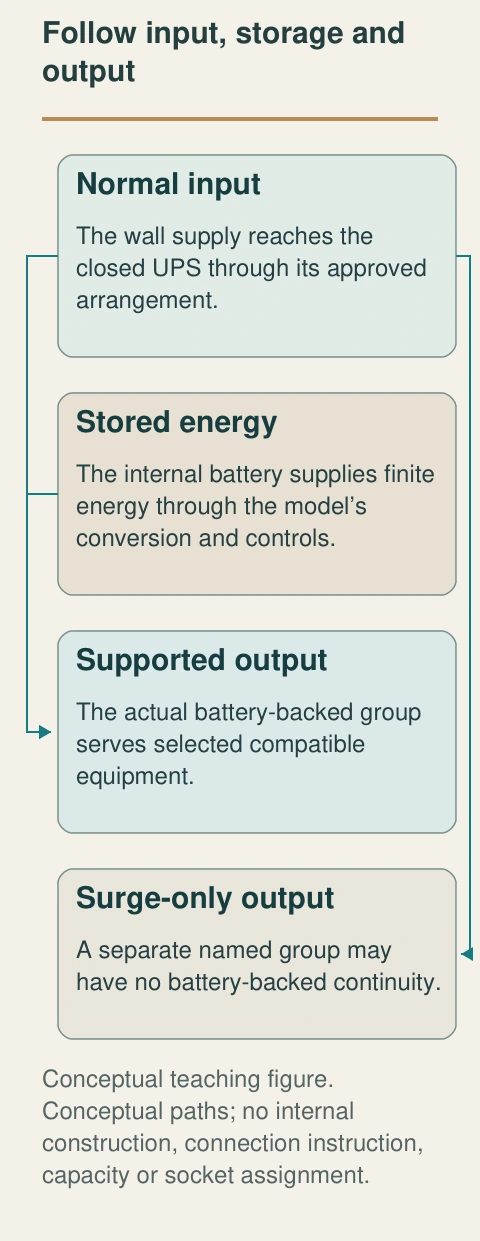
- Normal input
The wall supply reaches the closed UPS through its approved arrangement.
- Stored energy
The internal battery supplies finite energy through the model’s conversion and controls.
- Supported output
The actual battery-backed group serves selected compatible equipment.
- Surge-only output
A separate named group may have no battery-backed continuity.
What does this illustration leave out?
Conceptual paths; no internal construction, connection instruction, capacity or socket assignment. This illustration explains an idea. It is not an installation guide.
Which actual outlets and loads are confirmed in the matching manual?
Explore this with HomeAI ↗Opens an editable question. Nothing is sent until you choose to send it.Read the complete figure
Follow input, storage and output
Normal input and stored energy are different sources within the UPS arrangement. Only the model-identified output and supported load are in scope.
- Normal input
- The wall supply reaches the closed UPS through its approved arrangement.
- Stored energy
- The internal battery supplies finite energy through the model’s conversion and controls.
- Supported output
- The actual battery-backed group serves selected compatible equipment.
- Surge-only output
- A separate named group may have no battery-backed continuity.
What remains unknown: Conceptual paths; no internal construction, connection instruction, capacity or socket assignment.
A useful question: Which actual outlets and loads are confirmed in the matching manual?
Why might only some UPS outlets stay on?
Some UPS models have separate outlet groups with different jobs. A battery-backed group can supply its connected load for a limited period during a supported interruption. A surge-only group can offer its stated transient protection while having no battery-backed continuity. Two sockets on the same enclosure can therefore behave differently when normal input is lost. Their position alone is not a universal code.
The retained APC April 2026 manual is a named example of this distinction, including Canadian-suffix models. It should not be used as the operating manual for an unidentified unit. Match the exact model, outlet labels and supplied documentation. The conceptual rear view deliberately leaves socket assignment to that evidence. Its separate groups help explain the question; the image cannot label a real socket battery-backed.
Describe continuity equipment by equipment. A desktop computer, monitor, modem, optical terminal and router may be separate loads, even when the household calls them the office. If an essential link lacks supported supply, the end-to-end function can stop while another device stays on. This is why a single light on the UPS is insufficient evidence that work, internet or communication continued.
Have any assignment or change checked against the actual instructions and appropriate support. This page gives no plug-movement procedure, extension arrangement or permission to add a printer to either group. Keep a written list of the confirmed output assignments, date and responsible source. If the layout changes, revise the list. A useful record makes the next support conversation easier without claiming an outage test that nobody performed.
Outlet groups can have different continuity roles
The closed rear housing separates two groups of sockets. A real model can distinguish battery-backed and surge-only outputs, so the grouping helps explain why every connected item may not continue during an interruption.
Numbers identify the parts explained below.
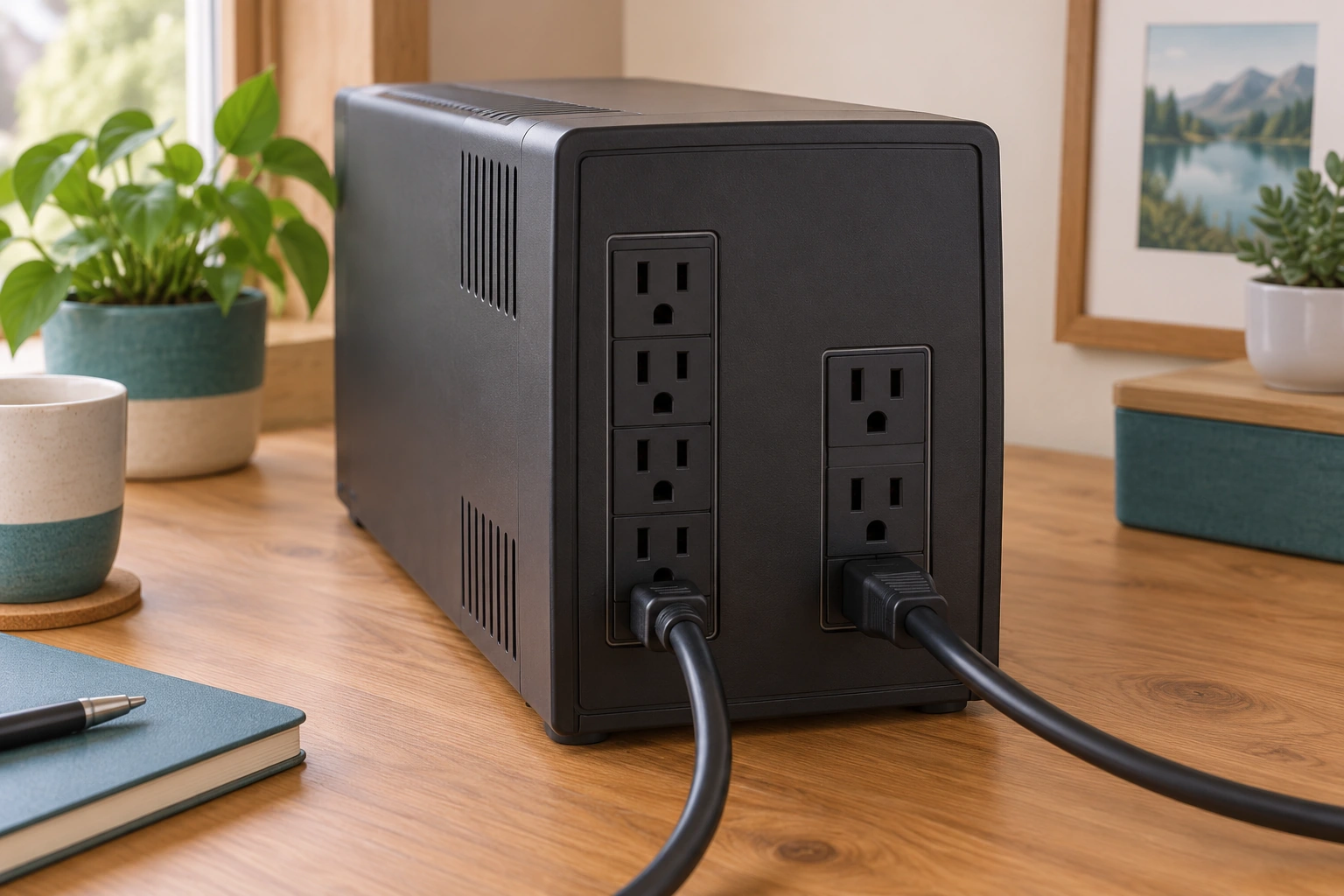
- First socket group
Physical grouping is visible; its real battery-backed role needs the actual label.
- Second socket group
A separate group can serve a different model-defined job.
- Closed housing and cords
No internal wiring or confirmed connected equipment is exposed.
What does this illustration leave out?
No pictured socket is assigned an actual function; labels and exact matching instructions govern. This illustration explains an idea. It is not an installation guide.
Which group supplies each actual load?
Explore this with HomeAI ↗Opens an editable question. Nothing is sent until you choose to send it.What do power and runtime describe?
Power describes a rate of energy use or delivery. Energy describes an amount available or consumed over time. A UPS must support the actual electrical demand and have enough usable stored energy for the intended task. Those are related but separate questions. A large-looking rating on a box is not itself a measured duration for the equipment beneath your desk.
Watts (W) express real power: the rate at which a load uses electrical energy. Volt-amperes (VA) measure apparent power: the effective (root-mean-square, or RMS) AC voltage multiplied by the effective (RMS) current. This describes the voltage-and-current demand the supply must carry; it can differ from the real power in watts. Eaton relates them through power factor: W = VA × power factor. Two UPS units with the same VA label can therefore have different watt limits.
Neither number is stored battery energy or a runtime in minutes. A suitable comparison keeps the exact model’s W limit, VA limit, actual supported loads and runtime conditions together; it does not convert a VA advertisement into a promise that a desk will run for a particular time. Ask the provider to explain both limits for the intended task without opening equipment or staging an outage.
Runtime also changes with the stated conditions. The supported load, battery condition, charge state and the manufacturer’s operating assumptions matter. A displayed time is a model-generated estimate for its context, not a guarantee that an outside service will remain available for that period. Preserve the load and state beside any estimate or service record, rather than copying the number into a permanent emergency promise.
A qualified comparison should state the intended outcome: for example, orderly shutdown of identified equipment rather than an unspecified long outage. Ask what assumptions were used and what has actually been verified. This guide intentionally provides no universal runtime table or sizing multiplier. A hypothetical arithmetic example can teach energy and power, but it cannot settle starting behaviour, compatibility, transfer response, battery health or the actual installed performance.
A useful comparison keeps four columns separate: the intended task, actual connected equipment, manufacturer-supported limits and evidence still needed. A seller may quote a headline VA rating while the owner needs a particular shutdown outcome. A support agent may discuss a reported load while the household has since added equipment. Placing those facts side by side exposes the missing relationship. It also avoids presenting a numerical rating as a decision by itself. Ask the provider to explain why the chosen arrangement suits the named task and how later changes should be handled.
Why can the computer stay on while the internet stops?
An internet task is a chain. The computer needs its own supply and a local connection. The router needs power and communication with the provider-facing equipment. A modem or optical terminal can be another powered device. Beyond the home, the provider’s network and the destination service must also be available. Supporting one link does not support every link automatically.
Start by naming the desired result. Saving a document locally, reaching a shared workplace service and receiving an internet phone call are different tasks. A powered screen can establish ordinary operation at that moment without proving that a file reached a remote destination. An app showing a connection symbol may also be stale or limited to the local wireless link. Keep the actual observation precise.
The home-internet companion owns the deeper modem/router/Wi-Fi explanation. Here the native dependency figure shows why UPS output and successful communication are separate. Each required local device needs its confirmed arrangement, and the external network remains its own service dependency. Ask the communications provider what the actual service requires during an outage, including any supplied backup and known limitations.
Keep offline contacts and an alternative information route in the household outage plan. Do not call an emergency number as a test or interrupt equipment to demonstrate a theory. If medical monitoring, accessible communication or another essential service depends on the network, involve the responsible care or service provider directly. A consumer desk UPS and a successful normal-day call do not establish continuity for those needs.
Powered equipment is only part of communication
A remote task needs a working local device, local network, provider connection and destination. Local stored power cannot establish the outside links.
Numbers identify the parts explained below.
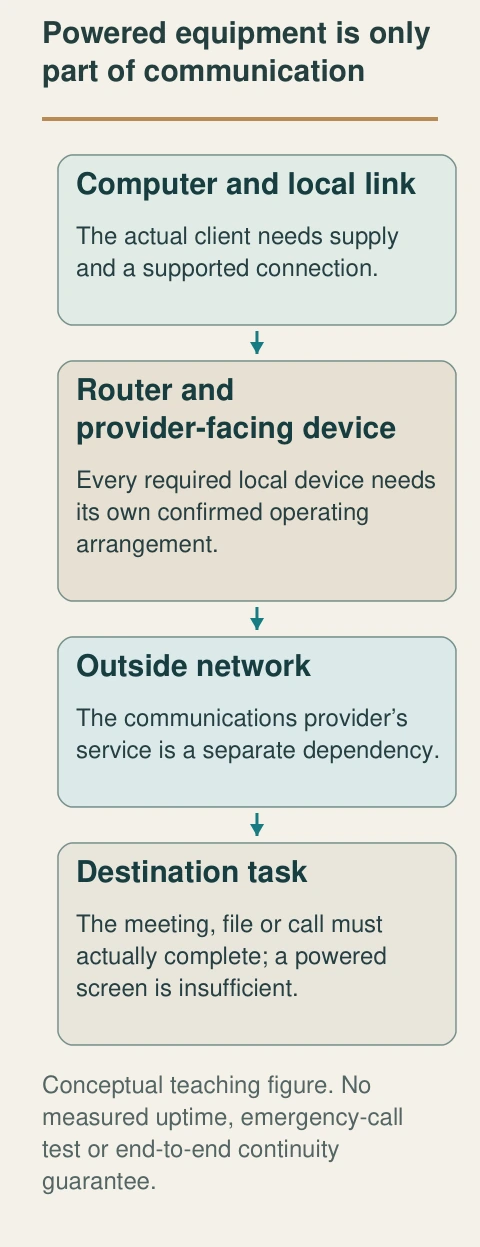
- Computer and local link
The actual client needs supply and a supported connection.
- Router and provider-facing device
Every required local device needs its own confirmed operating arrangement.
- Outside network
The communications provider’s service is a separate dependency.
- Destination task
The meeting, file or call must actually complete; a powered screen is insufficient.
What does this illustration leave out?
No measured uptime, emergency-call test or end-to-end continuity guarantee. This illustration explains an idea. It is not an installation guide.
Which link does the actual finding cover?
Explore this with HomeAI ↗Opens an editable question. Nothing is sent until you choose to send it.Local power and end-to-end service
- Computer or phoneIts own supported supply and operating condition.
- Router and provider-facing deviceEach actual device and connection needs its own arrangement.
- Outside network and destinationSeparate service availability; local power cannot guarantee it.
Dependency reasoning; no actual outage or emergency-call test.
Further reading: APC Back-UPS Pro · 120 Vac User Manual EN JPT92208.
Read the complete figure
Powered equipment is only part of communication
A remote task needs a working local device, local network, provider connection and destination. Local stored power cannot establish the outside links.
- Computer and local link
- The actual client needs supply and a supported connection.
- Router and provider-facing device
- Every required local device needs its own confirmed operating arrangement.
- Outside network
- The communications provider’s service is a separate dependency.
- Destination task
- The meeting, file or call must actually complete; a powered screen is insufficient.
What remains unknown: No measured uptime, emergency-call test or end-to-end continuity guarantee.
A useful question: Which link does the actual finding cover?
What can an indicator or alarm actually tell me?
An indicator is the equipment’s report of a defined state. Its meaning comes from the matching manual and edition, including the difference between normal operation, battery operation, low reserve, overload and a service warning. Colour, blinking and sound are not universal across products. Record the exact displayed wording or code from a safe position rather than translating it into a guessed electrical fault.
The generic front-view picture shows a closed enclosure and a small status area. It teaches where an owner might encounter reported information. Its abstract bars and amber mark are not an actual code or a battery-health result. The adjoining native figure connects each kind of record to the question it can answer: observed indication, manual meaning and qualified follow-up.
An event counter can support an account of what the device recorded under its rules. It does not necessarily identify the utility as the cause or reconstruct every interruption. An estimated runtime, a successful normal output and a service warning also answer different questions. Ask the provider how the available log should be interpreted, including any missing history or settings that affect the record.
Do not mute, reset or clear a warning merely to make the record look normal. Do not repeat an electrical event to collect another alarm. Follow the actual manufacturer’s response and appropriate qualified support. Smoke, sparks, abnormal heat, leakage or a burning smell require the immediate safety response, not a leisurely search through menu screens. The useful learning outcome is understanding what was reported and who should address it.
Preserve the original indication before a qualified response changes the state, when that can be done safely without delaying urgent action. A dated account can say that a warning was reported, that the manual identifies a relevant service question and that support was requested. Later add what was found and completed. Do not replace the first account with a retrospective statement that the battery was certainly defective unless the finding supports it. This simple timeline lets another provider understand both the original concern and the limits of the subsequent assessment.
A display reports a model-defined state
The closed UPS status area sits beside a laptop. A real display can report battery operation, load or a service concern, but its meaning comes from the matching manual rather than a universal colour code.
Numbers identify the parts explained below.
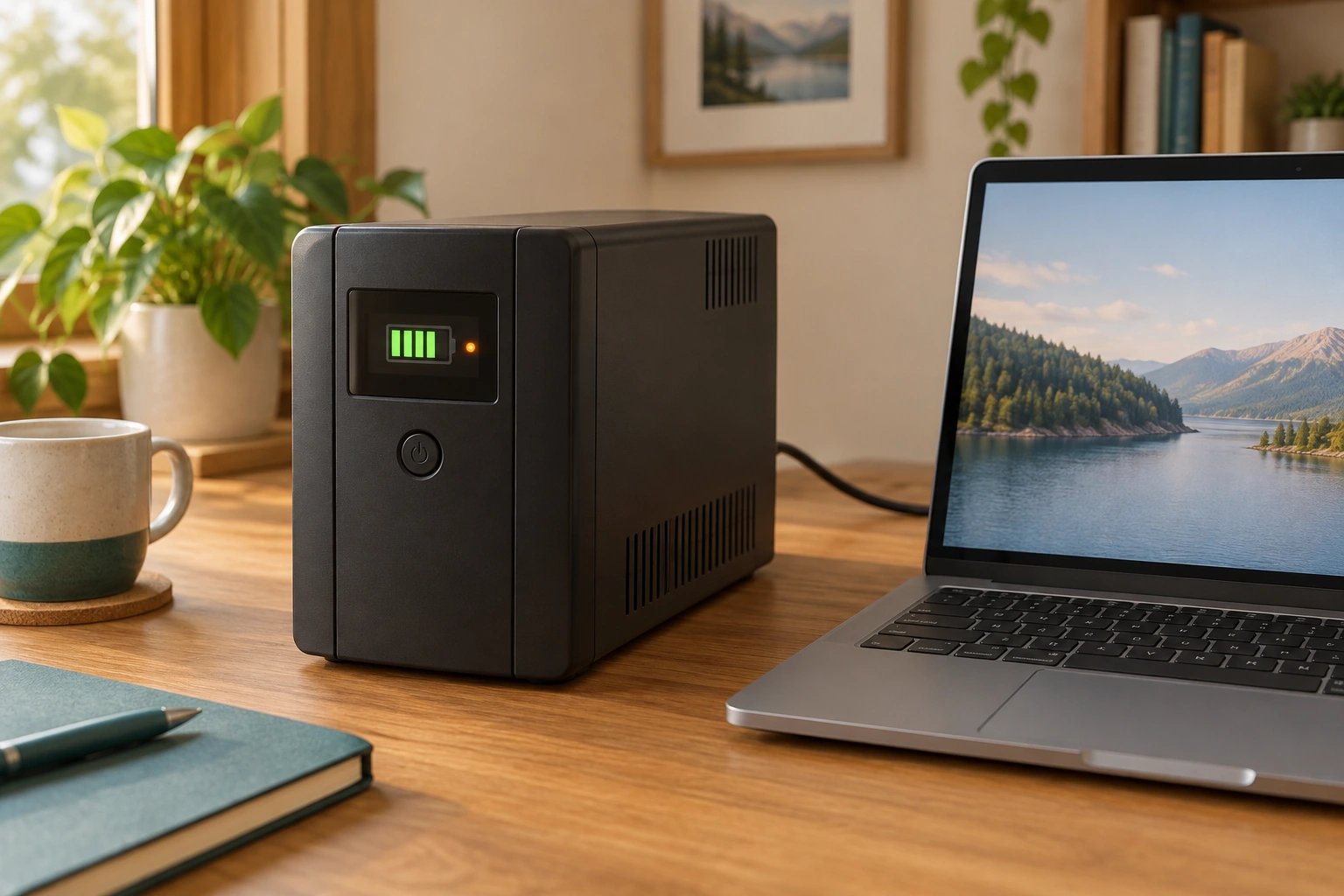
- Status area
A place to receive model-defined operating information.
- Closed UPS
Stored energy remains a safety consideration even without normal input.
- Laptop
Visible operation is separate from preserved work and outside communication.
What does this illustration leave out?
Abstract bars and amber mark are not an actual warning, battery finding or runtime. This illustration explains an idea. It is not an installation guide.
What did the actual device report and what does its manual mean?
Explore this with HomeAI ↗Opens an editable question. Nothing is sent until you choose to send it.Keep the three evidence states separate
- ObservedExact indication and event timing.
- ExplainedMeaning from the model-matched manual.
- AssessedQualified finding and completed response within named scope.
An abstract illustration provides none of these actual records.
Further reading: APC Back-UPS Pro · 120 Vac User Manual EN JPT92208.
What changes as the battery ages or the arrangement changes?
The energy store is a component with an operating history, rather than a permanent promise built into the enclosure. Its condition can change over time and with use. The exact manufacturer sets the maintenance and replacement instructions for the named product. A purchase date helps organize that history; it does not independently measure the battery’s remaining capability or clear a warning.
Keep the supplied safety instructions and service record, including the model, battery-related findings and completed authorized work. The APC named manual requires knowledgeable battery servicing and warns about stored electrical energy even when input is disconnected. This guide therefore provides no battery-opening, connector, replacement or disposal procedure. A disconnected cord is not permission to investigate inside the enclosure.
Changes outside the battery matter too. A replacement computer, added monitor, different service device or changed output assignment can alter the intended continuity arrangement. A successful finding for last year’s setup should not silently migrate to a new list of loads. Record the change and ask whether the selection and operating assumptions need review. Preserve the earlier evidence with its original date and scope.
Treat a service warning as an unresolved task until the appropriate response is completed and documented. An appointment request is not completed maintenance, and a new battery invoice is not automatically an end-to-end continuity result. Ask what was serviced and what operation was verified afterward. Reuse, recycling and transport also need the manufacturer’s current instructions and an appropriate local route; do not put a battery into ordinary waste because the desk unit looks small.
Where does qualified electrical work begin?
Permanent outlet provision, branch wiring, panel-mounted surge protection and investigation of electrical damage belong to an appropriate qualified electrical scope. A plug-connected accessory should not be used to conceal an unresolved installation question. Ontario ESA’s contractor terminology applies in Ontario; elsewhere, confirm the relevant local authority and qualified provider. Canadian geography changes the administrative process without changing the need to define the actual work.
A proposal should explain the identified concern, the equipment or circuits covered, the intended work and its exclusions. If panel surge protection is proposed, ask how the selected device and installation relate to the home’s actual system and other incoming routes. The Canadian manufacturer page calls for an electrical contractor. Its broad compatibility advertising is not a universal owner installation instruction or evidence that a chosen device fits every panel.
For plug-connected product advice, the manufacturer may resolve a model or status question while an electrician resolves a wiring question. An IT provider may help with supported shutdown software or a data workflow. These responsibilities can cooperate without becoming interchangeable. A software setup report does not inspect branch wiring; an electrical completion record does not prove every unsaved file will be preserved.
Keep records at the right level. Equipment identity, confirmed connection scope, qualified findings, applicable local completion documents and unresolved tasks form a readable handover. Do not label the whole property surge-proof or outage-proof after one accessory installation. The practical result is knowing what the arrangement is intended to do, what evidence supports that intention and what other service or household contingency still needs attention.
Compare proposals against the same task and boundary. One provider might cover a panel-mounted device, another a desk UPS and another the computer shutdown workflow. Their prices and completion statements are not interchangeable because their work differs. Ask each to identify the physical equipment, deliverable and remaining dependencies. When several providers are involved, name who coordinates the handover so the communications question is not assumed to belong to someone else. A well-organized proposal can still leave a task unresolved; mark it explicitly rather than filling the gap with the broadest marketing promise.
Why is orderly shutdown a separate job from keeping power on?
Electrical continuity can give a computer an opportunity to finish an orderly shutdown. It does not itself decide which documents are open, whether an application has completed its work or whether a remote copy exists. Those tasks involve the computer, operating system, applications and any supported communication with the UPS. A powered enclosure is one component in that workflow rather than a complete data-preservation finding.
A manufacturer may offer a communication connection and supported shutdown software for particular equipment. The retained APC manual describes that feature for its named family, with operating-system limitations. That example is a reason to obtain matching current documentation, not a universal software recipe. Ask an appropriate IT provider what is supported for the actual computer and what the software can and cannot complete. No download or configuration is performed by this guide.
Distinguish an application saving its local document from a remote service acknowledging receipt. A file visible on screen may contain changes that have not been saved. A locally saved file may still await synchronization. A service might require its own successful completion response. The evidence question is where the intended copy was actually retained, rather than whether the UPS display looked normal during the event.
Define the desired outcome in plain language before a verification is planned. For example, the task might concern a supported orderly operating-system shutdown under a specified scenario. It should identify the equipment, permissions, data precautions, expected record and limits. Any actual verification needs its appropriate safe and authorized scope; this article does not direct an owner to pull the input plug or provoke a battery event. An unperformed test remains unperformed.
A household should also maintain its ordinary backup and recovery arrangements separately. A UPS can address a particular interruption without addressing accidental deletion, a damaged drive or loss of an online account. Conversely, a stored backup does not keep a live call connected. The services have different purposes. Ask the IT provider how the continuity arrangement fits the existing data workflow, preserving the distinction between a proposed setup and demonstrated recovery.
How would a fictional desk setup become a clear support request?
Nora is a fictional homeowner with a desktop computer, monitor and router. A UPS is present, but she does not know its exact outlet assignments. During a reported interruption, the computer screen stayed on while the meeting disconnected. There is no retained event log or provider finding yet. Those observations are enough to ask useful questions, without deciding that the UPS or internet provider failed.
She records the equipment names already available, the approximate event time and what she directly observed. She asks the UPS provider to confirm the model and the supported output arrangement from its actual instructions. She asks the communications provider which local equipment and external services the connection needs. She does not unplug supply, move suspect equipment or stage another interruption to recreate the meeting problem.
One possible explanation is a missing powered local link, such as separate provider-facing equipment. Another is an external-service interruption despite local power. A third is a problem limited to the meeting service or client. The example assigns no probability and no actual diagnosis. The providers’ findings should say which possibility was assessed and what remained outside their assignment.
In the invented handover, the provider’s assignment list places the computer and monitor on battery-backed outputs, but identifies the separate provider-facing terminal on ordinary supply. That is a concrete local dependency missing from Nora’s original desk description. It does not prove the terminal caused the past meeting failure: the outside network and meeting service remain unassessed. Nora requests a supported review of that dependency and keeps an offline contact/work-saving plan, rather than treating a larger UPS rating as an established solution. No plug is moved and no interruption is staged in this example.
What belongs in the handover and the next learning step?
Begin the handover with a one-sentence purpose: the identified equipment and the supported task. Add exact product identity, matching owner and safety documents, confirmed output assignments and the provider’s findings. Keep any runtime estimate with its conditions and date. Put unresolved wiring, battery, data and outside-service questions beside the responsible contact so that an attractive device photograph does not become the entire record.
Separate intention, observation and finding. Intention says what the arrangement was chosen to do. Observation says what someone actually saw under stated conditions. A qualified finding explains a defined assessment and its limits. A normal operation check, a manufacturer status report and an end-to-end continuity test are different evidence. Claim only the work that actually occurred, preserving an untested outcome as untested.
Follow the adjacent guide that owns the remaining question. For recurring protective trips, use breaker/GFCI/AFCI education and qualified electrical advice. For household needs during a long interruption, use the outage plan. For installed storage and protected circuits, use the home-battery guide. For modem, router and wireless behaviour, use the home-internet guide. These links deepen the appropriate mechanism instead of expanding a desk accessory into a universal answer.
Review the file after a meaningful change to equipment, location, occupants or service, and whenever the actual instructions call for attention. This is a trigger to update evidence, not an invented testing interval. Keep essential contact information available offline. The owner should finish able to explain the different jobs of a bar, surge device and UPS, describe the actual supported scope and recognize when the next step belongs with a qualified provider.
Keep learning about the connected parts
- Why does a breaker trip? Understand GFCI and AFCI protection
- Home backup batteries: what stays on and for how long?
- A power outage plan for heating, water and communications
- Electrical renovation records: what was actually checked?
- Build a home-care record that the next person can understand
- How home internet works: follow the service, router and room connection
Canadian context and authorities · Visual atlas · Learning labs
Practice the distinction.
Nora separates local power from a disconnected meeting
Fictional desk event: the computer screen stayed on while an online meeting disconnected; outlet assignments and service cause remain unknown.
Reported observations
- The invented output assignment lists computer and monitor on battery-backed outputs.
- A separate provider-facing terminal is documented on ordinary supply.
- The past interruption cause, outside network and meeting service remain unassessed; no outage is staged.
Compare the explanations
Expand each possibility to see the evidence needed to distinguish it. Similar symptoms can have different mechanisms.
A required local link lacked supported supply
Separate modem, terminal or router arrangements may need clarification.
Model-matched supply assignment and communications-provider explanation.
Another service link was unavailable
External network or destination service can fail despite local power.
A scoped provider finding and preserved event timing.
A useful next question
Ask the responsible providers to review the documented missing local dependency, retaining the outside-service limit and offline work/contact plan.
No inspected property, measured runtime, successful test, medical continuity or recommended product.
Know what the words mean.
- Surge
- A brief voltage rise; a different condition from loss of normal supply.
- UPS
- Equipment that can supply a stated connected load from stored energy during supported input interruptions.
- Battery-backed outlet
- A model-identified output supported by the UPS battery within its limits.
- Surge-only outlet
- An output with stated surge protection but no battery-backed continuity.
- Runtime estimate
- An estimate of supported duration under stated load, battery and operating conditions.
Questions to bring
to the conversation.
- Which task, connected loads and exact battery-backed outputs are documented?
- What are the model’s separate W and VA limits, and what conditions accompany any runtime estimate?
- Which modem, terminal, router and outside services must remain available for the task?
- What did the actual event record or scoped assessment establish, and which dependency remains unknown?
- Who owns battery, electrical, communications and data follow-up?
Separate a showing observation, an existing record and a new professional assessment. Unknown means a question remains; it does not automatically mean a defect.
Use the evidence planner ↗Go to the source.
Original HomeAI explanation informed by these public references. Sources support the underlying guidance; they have not reviewed or endorsed HomeAI. Diagrams are conceptual, and calculator outputs depend on your inputs.
Read current complete substantive ESA, Schneider and Eaton bodies and complete extracted APC April 2026 manual October 14. Exact named-model and Ontario scope retained. Separate supplied Safety Guide, linked warranty and handbook not independently read. No installation, battery-access, reset/settings, wiring, overload experiment, product recommendation, medical clearance, warranty amount or actual runtime supplied. Fictional case is not test evidence. Author draft remains pending independent and publication acceptance.
Publication & source review
First published .
Sources reviewed .
Have a question about your home?
Start with the symptom, timing and what you have observed.
Ask HomeAI